Good files print sharp and on time. Not sure your file is ready? Send it anyway. We check every file and send a proof before anything is made.
Print area and safe area
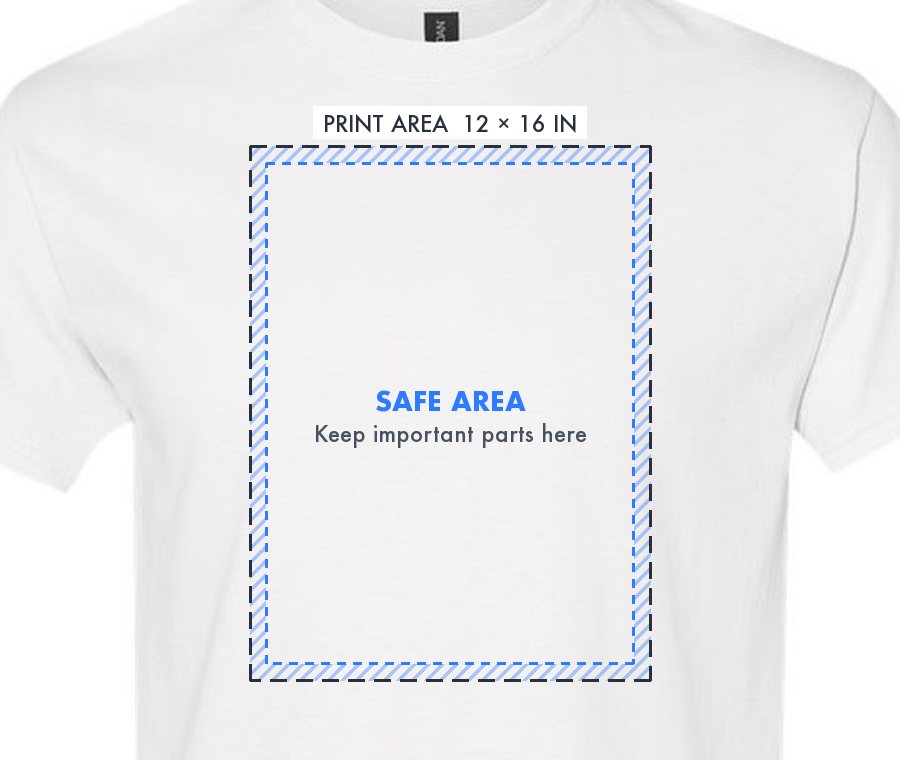
- Standard print area (gray dashed line): the usual size for that spot, and what most orders use.
- Going bigger or somewhere else? You're not limited to the box. Designs past it, like oversized prints or a spot near the hem, become custom placements. The line turns amber, and we confirm what's possible (and any extra cost) in your quote.
- Safe area (inside the blue line): keep text, faces and anything important here. The striped edge is about 0.5 in on the front and back, and 0.25 in on labels and sleeves.
- Why: every garment sits slightly differently on the press, and seams, collars and hems are close by. Backgrounds and shapes can run into the striped edge; just keep the important parts in.
File type
- PNG with a transparent background works for every method.
- Vector (SVG) is ideal, especially for screen printing and embroidery, because it stays sharp at any size.
- JPG can't be transparent, so its background prints too. Use it only for designs that are a full rectangle, like a photo.
- Uploads can be up to 20 MB. Save in the sRGB color profile; other profiles can shift colors.
Size and resolution
Make your file at the size it will print, at 150 DPI or more. 300 DPI is best for fine detail. The editor shows the DPI of every upload as you resize it.
| Placement | Print width | Minimum | Best |
|---|
| Full front or back | 12 in | 1800 px | 3600 px |
|---|
| Left chest | 4 in | 600 px | 1200 px |
|---|
| Sleeve | 3.5 to 4 in | 600 px | 1200 px |
|---|
| Label | 3.5 in | 525 px | 1050 px |
|---|
- Enlarging a small image doesn't add detail. A 600 px logo stretched to 12 in prints at 50 DPI and looks blurry.
Backgrounds and see-through effects
- Anything that isn't transparent gets printed, including white or black boxes around your design. On dark shirts a black box can print as a gray rectangle.
- In your editor a transparent background shows as a checkerboard. If you see a solid color, remove it, or use Remove background in our editor.
- Soft shadows, glows and fades are partly see-through and can print speckled or with a light halo, especially on dark garments. Solid colors print cleanest. For a fade, use a halftone dot pattern.
- Check edges after removing a background. Leftover haze shows up as a faint outline on the shirt.
Color and detail
- Screens are brighter than ink. Neon, very bright and pale pastel colors print a little duller than they look on screen.
- Black on a black shirt, or white on a white shirt, barely shows. Pick colors that contrast with the garment.
- Keep lines at least 0.02 in (0.5 mm) thick and text at least 0.15 in tall, or fine detail can drop out.
- Fabric changes the look. 100% cotton gives the boldest color; heathers and blends look softer and more vintage. Keep designs clear of hoodie pockets, zippers and seams.
DTF transfers
- Full color, photos and fine detail all work. We add white under the design on colored garments automatically.
- See-through areas are the main thing to avoid. Turn shadows and fades into solid colors or halftones.
Screen printing
- Each ink color is its own screen, so designs with 1 to 6 solid colors print best and cost less.
- Send vector art if you can. Gradients are printed as halftones.
- Need an exact brand color? Tell us the Pantone (PMS) number in your notes.
Embroidery
- Up to 12 thread colors per design. We match each color to the closest thread and show it on your proof.
- Text at least 0.25 in tall, and lines at least 0.05 in (1.3 mm) thick. Thinner strokes break up in stitches.
- No photos, gradients or shadows. Flat, solid shapes stitch best.
- Avoid tiny gaps and outlines inside the design; fill small spaces with color or simplify them.
- Left chest designs are usually up to 4 in wide; front and back up to 10 in.
- We digitize your artwork into a stitch file and send a proof before stitching. New designs may include a one-time digitizing fee in your quote.
Not print-ready? Tick Artwork redesign under Notes and our team will rebuild it for you.